

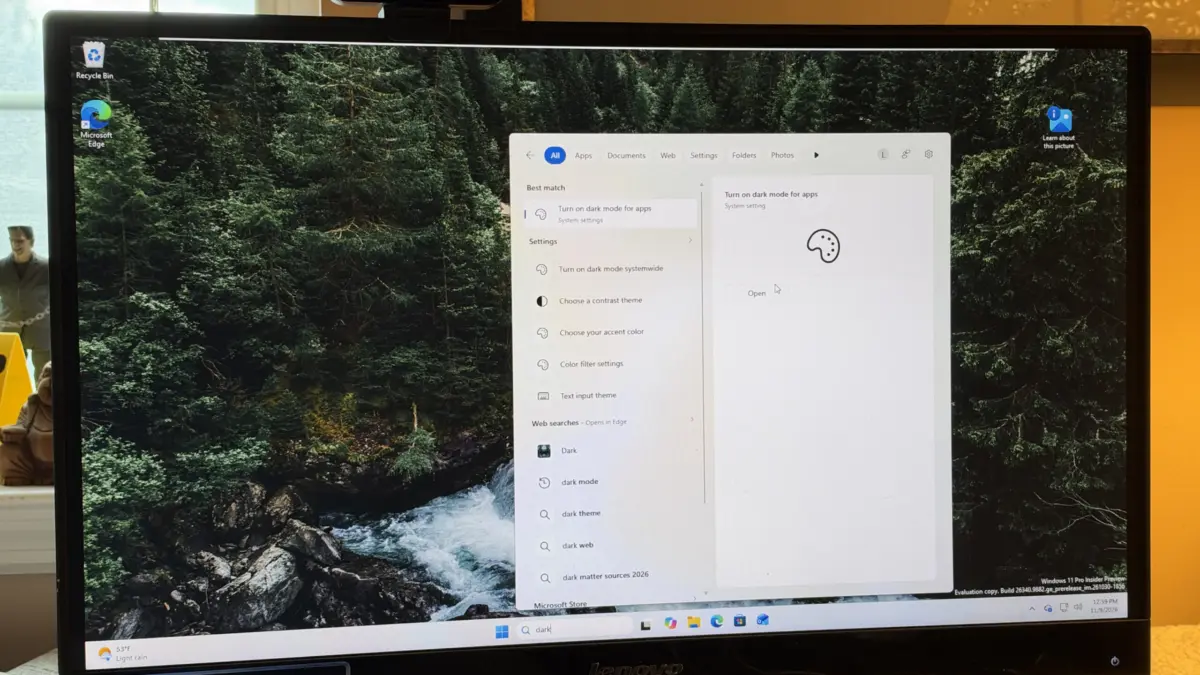
Microsoft has officially initiated a significant overhaul of the Windows 11 Search interface, introducing a suite of features designed to reduce friction and improve system responsiveness. The tech giant is currently testing these enhancements within the Windows Insider Program, specifically targeting the Beta Channel with Build 26320.9876. The centerpiece of this update is the introduction of "inline actions," a functional shift that allows users to toggle system settings and execute commands directly from the search results window, bypassing the need to open the full Settings application. This move represents a broader strategic effort by Microsoft to modernize the Windows user interface using the WinUI 3 framework, ensuring that the operating system remains competitive in an era where user efficiency and "zero-latency" workflows are paramount.
The Evolution of Windows Search: From Indexing to Action
For years, Windows Search functioned primarily as a file and application locator. Users would type a query, and the system would return a list of local files, web results via Bing, or links to specific pages within the Settings app. However, this often required multiple clicks to achieve a simple task, such as turning off Bluetooth or adjusting screen brightness. With the rollout of Build 26320.9876, Microsoft is transforming Search into a command center.
The new "inline actions" feature leverages the WinUI 3 framework to provide interactive elements within the search dropdown. For instance, if a user types "Bluetooth" into the search bar, the results will not merely offer a link to the Bluetooth settings page; they will include a functional toggle to turn the radio on or off instantly. This capability extends to several critical system functions, including:
- Display Management: Users can adjust screen brightness via a slider or toggle Dark Mode and Light Mode without leaving the search interface.
- Audio Controls: A "Mute" command or volume slider allows for immediate audio adjustments.
- Connectivity: Quick toggles for Wi-Fi and Bluetooth streamline peripheral management.
- Window Management: Commands to arrange windows or snap layouts can be initiated via text-based queries.
By integrating these controls, Microsoft is addressing a long-standing criticism regarding the "buried" nature of Windows settings. This update aligns Windows 11 more closely with the "universal search" philosophies seen in macOS’s Spotlight or third-party productivity tools like Raycast and Alfred.
Technical Foundations: The Transition to WinUI 3
The performance improvements cited in the latest Insider build are largely attributed to the migration of the Search interface to WinUI 3. WinUI 3 is the latest generation of the Windows UI library, designed to provide a modern, high-performance framework for both Win32 and .NET applications. Unlike previous iterations that relied on older XAML islands or legacy codebases, WinUI 3 allows for smoother animations, faster rendering of visual elements, and a more consistent "Mica" or "Acrylic" aesthetic that defines the Windows 11 design language.
Microsoft has stated that this transition makes the search experience "faster and more efficient," with a streamlined design that makes results easier to scan at a glance. For users on hardware with limited resources—specifically those running Windows 11 on the minimum requirement of 8GB of RAM—the efficiency of WinUI 3 is crucial. It reduces the memory footprint of the shell components, ensuring that system-level searches do not cause the stuttering or lag that has occasionally plagued earlier versions of the OS.
Intelligence and Accessibility: Fuzzy Logic and Facial Recognition
Beyond the structural changes to the UI, Microsoft is incorporating smarter algorithms to handle user error. A common pain point in previous versions of Windows was the rigidity of the search index; a single typo would often result in "No results found" or irrelevant web suggestions. The latest update introduces improved fuzzy logic, allowing the system to interpret misspelled queries. For example, typing "drak" will now correctly trigger the "Dark Mode" setting, recognizing the intent behind the keystrokes.
In addition to search improvements, Build 26320.9876 addresses hardware-specific user experiences, particularly regarding Windows Hello. Facial recognition technology often struggles in low-light environments, leading to failed login attempts and forcing users to revert to PINs or passwords. Microsoft has introduced a new accessibility feature that allows the screen to act as a fill light. When enabled, the display will temporarily increase its brightness during the facial recognition process to illuminate the user’s face.
To activate this, users can navigate to Settings > Accounts > Sign-in options > Facial recognition and toggle the switch for "Automatically adjust screen brightness during face recognition." This small but impactful change highlights Microsoft’s focus on biometric reliability across diverse environmental conditions.

Chronology of Windows 11 Search Updates
The current update is part of a multi-year trajectory to refine the Windows 11 experience following its 2021 launch. To understand the significance of Build 26320.9876, it is helpful to look at the timeline of Search evolution:
- October 2021 (Launch): Windows 11 introduces a centered taskbar and a simplified search icon, though the backend remains largely similar to Windows 10.
- 2022-2023: Microsoft experiments with various "Search highlights," integrating Bing images and trending news into the search box, which received mixed reviews from professional users seeking a cleaner interface.
- Early 2024: The integration of Copilot (AI) begins to blur the lines between local search and generative AI assistance.
- Late 2024 (Current): The focus shifts back to "core utility," prioritizing speed, WinUI 3 implementation, and direct system control (inline actions).
Broader Industry Implications and Analysis
Microsoft’s decision to empower the search bar with direct system controls is a reflection of the "command-line-lite" trend in modern computing. Power users have long preferred keyboard-driven workflows to mouse-driven navigation. By allowing users to type "mute" or "bluetooth" and hit enter, Microsoft is catering to a demographic that values speed over visual navigation through nested menus.
Furthermore, this update serves as a defensive move against the increasing complexity of the Windows Settings app. As Windows 11 has matured, the Settings menu has grown to encompass hundreds of sub-menus to accommodate the deprecation of the legacy Control Panel. This complexity can be overwhelming for casual users. Search-driven "inline actions" provide a shortcut that bypasses this complexity entirely, effectively creating a "flat" navigation structure where any setting is only a few keystrokes away.
From a competitive standpoint, Microsoft is also keeping pace with Apple’s macOS. Apple has steadily improved Spotlight to include basic calculations, unit conversions, and system commands. By adding typo-tolerance and WinUI 3-driven speed, Microsoft is ensuring that Windows remains the preferred platform for productivity-focused users who demand a responsive OS.
Official Guidance for Windows Insiders
For users interested in testing these features before the general public, enrollment in the Windows Insider Program is required. Specifically, these features are rolling out to the Beta and Experimental channels. Microsoft uses these channels to gather telemetry and feedback on how the new Search interface handles various hardware configurations.
To verify eligibility, users should ensure they are running Build 26320.9876 or higher. This can be checked by navigating to Settings > System > About and reviewing the "Windows specifications" section. Microsoft has cautioned that because this is a phased rollout, not all Insiders will see the features immediately, as the company monitors for stability issues before a wider release.
The update also includes minor refinements to Live Captions, File Explorer performance, and the integration of Microsoft 365 cloud storage alerts within the system tray. These cumulative changes suggest that Microsoft is cleaning up the "technical debt" of Windows 11 as it prepares for the next major version of the operating system.
Anticipated Release Schedule
While Microsoft has not provided an exact date for the public release of these features, historical patterns suggest a near-term deployment. Most features tested in the Beta channel during the autumn months are bundled into the final "Patch Tuesday" updates of the year. Industry analysts expect these Search enhancements to reach the general user base by the December 8, 2024, update cycle. This timing allows Microsoft to finalize the 2024 feature set before the holiday period, providing a more polished experience for users purchasing new hardware during the end-of-year sales.
In conclusion, the transition to WinUI 3 and the introduction of inline actions represent a significant maturation of the Windows 11 interface. By prioritizing speed, accuracy, and direct control, Microsoft is evolving the search bar from a simple index into a dynamic tool for system management, effectively reducing the "time to task" for millions of users worldwide.
