

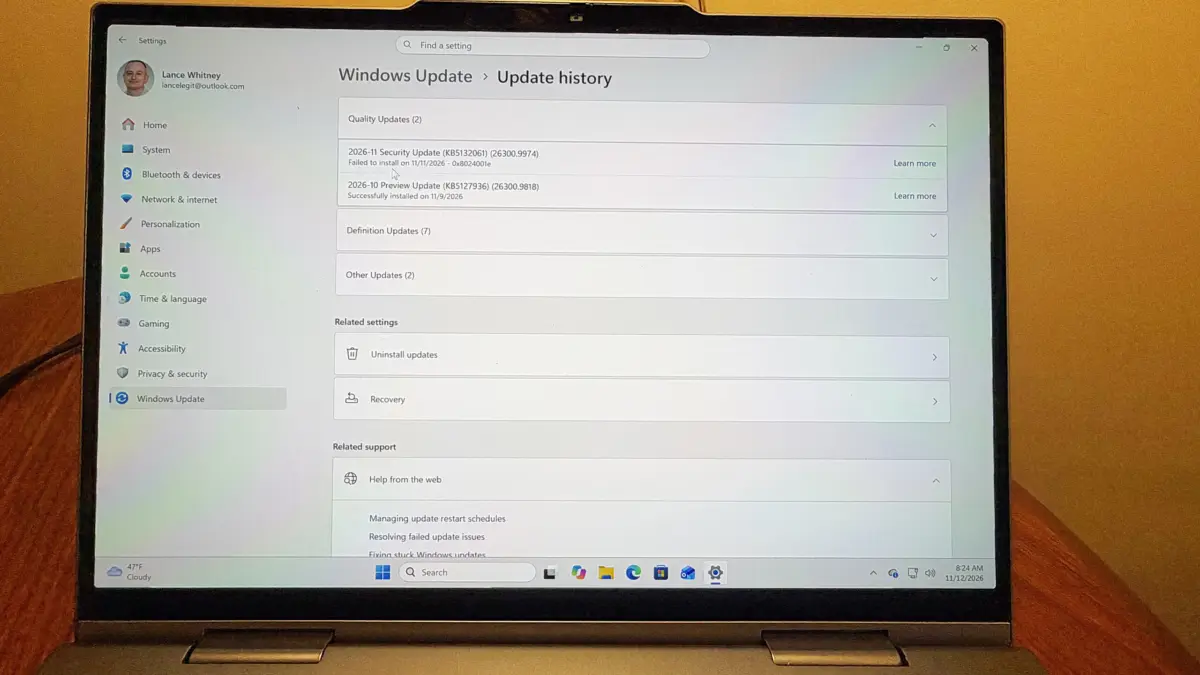
Microsoft has officially acknowledged and initiated a resolution for a technical glitch affecting the installation of the November 2024 Patch Tuesday update for Windows 11. The issue, which primarily impacts users who participated in the late-October preview cycle, results in failed installations and repetitive update loops, preventing systems from applying critical security patches. While the tech giant has identified the root cause as a conflict between the preliminary preview build and the final mandatory update, the incident highlights the ongoing complexities of the Windows servicing model.
The specific update in question, designated as KB5132061, was released on November 10 as part of Microsoft’s monthly "Patch Tuesday" cadence. This update is categorized as a mandatory security release, designed to address various vulnerabilities within the operating system while also rolling out several quality-of-life features. However, a significant subset of users reported that the installation process would either stall indefinitely or fail with specific error codes, including 0x80070306, 0x800f0989, and 0x800f0993.
Technical Root Cause and the Update Lifecycle
The friction within the update process appears to stem from a conflict with the October 28 preview update, labeled KB5127936. To understand why this occurred, it is necessary to examine Microsoft’s dual-phase monthly update strategy.
Each month, Microsoft typically issues two distinct types of updates. The first, often referred to as the "C" release or the preview update, arrives toward the end of the month. This release is optional and focuses on non-security features, bug fixes, and interface adjustments. It serves as a testing ground for IT administrators and "early adopters" to vet changes before they are integrated into the broader release.
The second phase is the "B" release, better known as Patch Tuesday. This is a cumulative update that includes all the features from the previous month’s preview, alongside critical security patches. Under normal circumstances, the Patch Tuesday update should seamlessly overwrite or integrate with the preview build. In this instance, however, the transition from the October preview (KB5127936) to the November security update (KB5132061) triggered a logic error in the Windows Update agent, leading to the reported installation failures.
Chronology of the November Update Conflict
The timeline of the issue began in late October and reached a resolution phase by mid-November:
- October 28, 2024: Microsoft releases the optional preview update KB5127936. This build introduced several anticipated features, including a customizable right-click menu and the "Cloud Rebuild" recovery option.
- November 10, 2024: The official Patch Tuesday update, KB5132061, is rolled out globally. This update is mandatory for maintaining system security and compliance.
- November 11, 2024: Reports begin to surface on support forums and social media regarding failed installations. Users describe systems stuck in "undoing changes" loops and persistent error messages.
- November 11, 1:00 PM ET: Microsoft acknowledges the issue on its Windows Release Health dashboard and announces the deployment of a Known Issue Rollback (KIR).
- November 12-13, 2024: The KIR propagates through the Windows Update infrastructure, effectively neutralizing the glitch for the majority of affected users.
Analysis of Error Codes and System Behavior
The error codes associated with this glitch—0x80070306, 0x800f0989, and 0x800f0993—are indicative of state-management failures within the Windows Component Store (WinSxS).
Error 0x80070306 typically suggests a "source file not found" or a version mismatch during the staging phase of the update. In this context, the update agent likely detected a version of a system file from the October preview that it did not recognize as a valid baseline for the November security patch. Error 0x800f0989 and 0x800f0993 are more generalized failure codes often associated with the Deployment Image Servicing and Management (DISM) tool, signaling that the operating system was unable to finalize the installation of the new cabinet files.
For users caught in this loop, the experience is often frustrating. The system attempts to download the update, proceeds to the "Restarting" phase, reaches a certain percentage of completion, and then displays a message stating, "Something didn’t go as planned. No need to worry—undoing changes." This cycle can repeat multiple times, consuming system resources and extending boot times.
Official Response and the Known Issue Rollback (KIR) Solution
Microsoft’s primary mechanism for resolving such widespread installation issues without requiring manual user intervention is the Known Issue Rollback (KIR). Unlike a traditional patch, which requires a user to download a new file, a KIR is a server-side configuration change.
When a KIR is activated, Microsoft sends a specific instruction to the Windows Update client on individual PCs. This instruction tells the system to bypass the problematic code path or to ignore the specific conflict that was causing the installation to fail. According to Microsoft, the fix for KB5132061 should reach all consumer and non-managed business devices within 24 to 48 hours of the announcement.

For enterprise environments where updates are managed via Windows Server Update Services (WSUS) or Microsoft Endpoint Configuration Manager, administrators may need to install and configure a specific Group Policy to apply the rollback. Microsoft has provided dedicated Group Policy templates for various versions of Windows 11 to facilitate this process for IT departments.
Key Features Impacted by the Update
While the primary focus of the November update is security, the installation failure also prevented users from accessing several high-profile features that were initially introduced in the October preview. These features represent Microsoft’s ongoing effort to refine the Windows 11 user experience:
Customizable Right-Click Menu
The updated context menu aims to address one of the most common complaints regarding Windows 11: the simplified right-click menu that often hid legacy options under a "Show more options" button. The new update allows for greater customization, enabling users to pin frequently used applications and tools directly to the primary menu, reducing clicks and improving workflow efficiency.
Cloud Rebuild Recovery Option
Perhaps the most significant functional addition is the "Cloud Rebuild" feature. Historically, if a Windows installation became corrupted to the point where it could not boot, users often had to rely on local recovery partitions or external USB installation media. Cloud Rebuild allows the system to download a fresh, clean version of Windows 11 directly from Microsoft’s servers during the recovery process, even if the local recovery files are damaged. This feature mirrors functionality found in macOS and is seen as a major step forward for system resilience.
Integrated Network Speed Test
Microsoft is also testing a built-in internet speed test tool directly within the Settings menu. This eliminates the need for users to visit third-party websites to diagnose connectivity issues, integrating essential diagnostic tools directly into the OS.
Broader Implications for Windows Update Reliability
This latest glitch arrives at a time when Microsoft is under increased scrutiny regarding the stability of its update ecosystem. The recent global outage caused by a CrowdStrike update, while not a Microsoft failure itself, heightened public awareness of how fragile interconnected software systems can be. Similarly, recent Windows 11 updates have occasionally caused issues with BitLocker recovery prompts and Wi-Fi connectivity.
Industry analysts suggest that the increasing complexity of Windows 11, which now integrates AI-driven features like Copilot and advanced virtualization-based security, makes the testing process more difficult. The "Preview" update system is intended to mitigate these risks, but as this incident demonstrates, the interaction between preview builds and mandatory releases can still create unforeseen conflicts.
For Microsoft, the priority remains maintaining a high "Patch Tuesday" adoption rate to protect against zero-day vulnerabilities. When installation glitches occur, they risk creating a "patch fatigue" among users, who may become hesitant to install updates promptly for fear of breaking their systems.
Recommendations for Affected Users
Microsoft advises that users currently experiencing installation failures should first ensure their devices are connected to the internet to receive the KIR signal. The company suggests the following steps for those who wish to manually trigger the fix:
- Navigate to Settings > Windows Update.
- Click the "Check for updates" button. This forces the client to communicate with Microsoft’s servers and retrieve the latest instructions.
- If the update KB5132061 (26300.9974) appears again, proceed with the installation.
- If the error persists, users are encouraged to wait the full 48-hour window before attempting further manual troubleshooting, such as clearing the Windows Update cache or running the DISM tool.
For users who are not in a rush to receive new features, the recurring issues with preview builds serve as a reminder that staying on the "Stable" path—by not manually checking for optional updates—is often the safest route for system stability. By avoiding "C" releases, users ensure they only receive software that has undergone an additional two weeks of real-world testing.
As Windows 11 continues to evolve toward the 24H2 version and beyond, the balance between rapid feature deployment and system reliability will remain a central challenge for Microsoft’s engineering teams. The swift deployment of the KIR for the November update shows that the infrastructure for fixing these issues is robust, even if the initial glitches remain an inherent risk of modern software development.
