

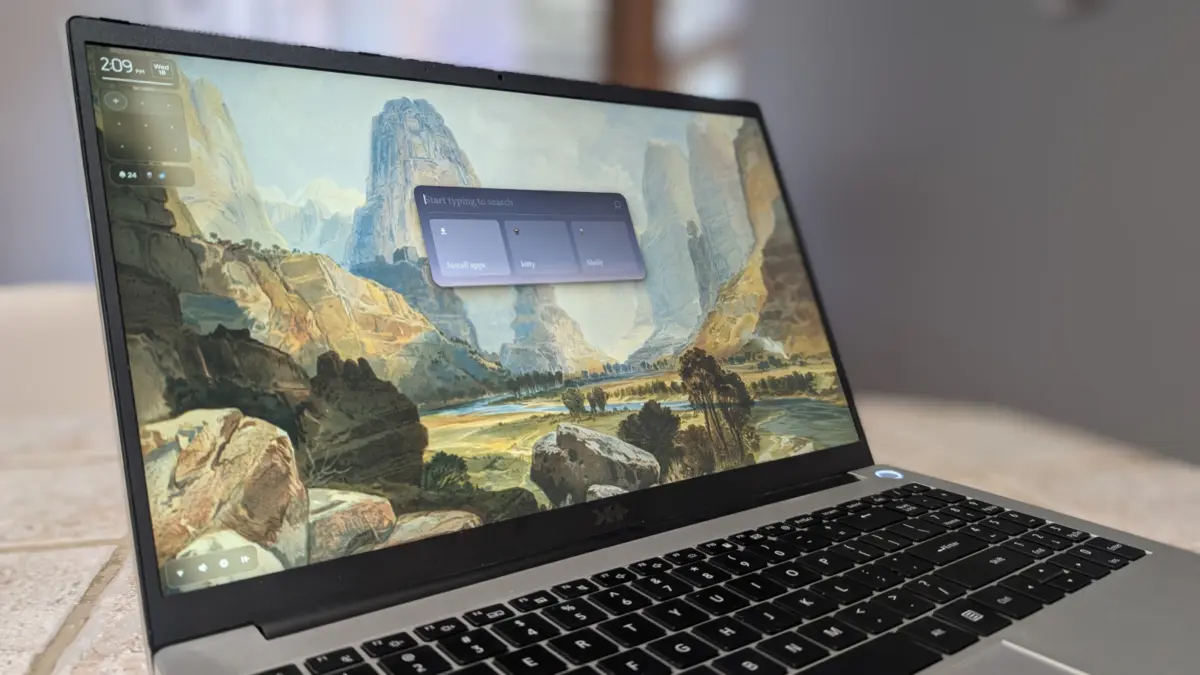
The landscape of the Linux operating system has long been defined by its modularity and the sheer breadth of choice available to the end-user. From the underlying kernel architecture to the high-level desktop environment, the platform allows for a degree of customization that remains unparalleled in the computing world. This ecosystem, characterized by a staggering variety of distributions, package managers, and terminal applications, has recently seen the emergence of a new contender that seeks to challenge traditional user interface (UI) conventions. Known as Pond, this distribution represents a significant departure from the standard desktop metaphor, blending elements of tiling window managers, mobile operating systems, and modern desktop environments like GNOME into a cohesive, experimental platform.
Developed by the team at Butterfly, Pond is positioned not merely as another aesthetic skin for Linux, but as a fundamental rethinking of how a user interacts with a digital workspace. According to the project’s mission statement, Pond is an opportunity to experiment with new ideas intended to make the computing experience feel more natural and satisfying. By utilizing the Niri window manager and a custom-built interface, the developers have created a system that prioritizes spatial efficiency and workflow fluidity, addressing the steep learning curve often associated with advanced Linux configurations.
Technical Architecture and the Arch Linux Foundation
At its core, Pond is built upon Arch Linux, a choice that carries significant implications for its performance and maintenance model. Arch Linux is renowned in the developer community for its "keep it simple" (KISS) philosophy and its rolling-release schedule. Unlike point-release distributions such as Ubuntu or Debian, which require major upgrades every few years, an Arch-based system like Pond receives continuous updates. This ensures that users always have access to the latest software versions and security patches without the need for a complete system reinstallation.
The technical foundation of Pond includes a highly modern kernel, reported as version 7.3.4-3 in recent builds. This inclusion signifies a commitment to cutting-edge hardware support, ensuring that the operating system can leverage the latest advancements in processor architecture and peripheral connectivity. By basing the system on Arch, Pond also gains access to the Arch User Repository (AUR), one of the largest collections of community-maintained software in the Linux world, providing a vast library of applications that can be integrated into the unique Pond UI.

The Infinite Strip: A New Paradigm for Window Management
The most striking feature of Pond is its user interface, which abandons the traditional "floating window" model in favor of an "infinite strip" layout. This is achieved through the integration of Niri, a scrollable tiling Wayland compositor. In a conventional desktop environment, windows are stacked on top of one another, often requiring the user to minimize, maximize, or manually resize elements to manage their workspace. Pond, however, organizes windows into columns along a horizontal axis that extends infinitely from left to right.
This spatial arrangement allows users to navigate their open applications by scrolling horizontally, much like moving through a physical film strip or a panoramic image. In a multi-monitor configuration, Pond assigns a unique strip to each display. This prevents windows from "overflowing" across monitors, a common frustration in traditional tiling setups. Instead, each screen acts as an independent viewport into the user’s workflow.
Furthermore, Pond utilizes dynamic workspaces. The system automatically generates a new workspace to the right of the farthest-right window, ensuring that the user never runs out of virtual real estate. This approach combines the organized efficiency of a tiling window manager with the intuitive navigation of a touch-based mobile interface. It bridges the gap for users who desire the productivity benefits of a tiling manager but find the keyboard-heavy nature of tools like i3 or Sway to be intimidating.
Streamlined Application Management and Installation
Pond introduces a simplified method for application interaction and installation that moves away from traditional nested menus. The system does not feature a conventional "Start" menu. Instead, it relies on a centralized launcher, accessed via the Super+Space key combination. This launcher serves as the primary gateway for both launching existing software and acquiring new tools.
The installation process in Pond is notably streamlined to reduce friction. While the system retains the power of the terminal and the pacman package manager for advanced users, it offers a more accessible alternative through the launcher. To install a program, a user simply types "install" followed by the name of the application—for example, install libreoffice. The system then handles the backend processes, often utilizing Flatpak for sandboxed application delivery.

If an application requires the native pacman manager for system-level integration, the UI prompts the user for their administrative password within the workflow, maintaining a sense of continuity. This hybrid approach caters to both the "power user" who demands terminal access and the "general user" who prefers a more guided, graphical-adjacent experience.
Chronology of Development and Design Philosophy
The development of Pond follows a broader trend in the Linux community toward "opinionated" desktops. Historically, Linux was divided between the highly traditional (XFCE, MATE) and the radically modern (GNOME). The timeline of Pond’s development suggests it was born out of a desire to find a middle ground—one that embraces the efficiency of tiling but acknowledges the necessity of a mouse-driven interface.
- Conceptualization: The Butterfly team sought to address the fragmentation of the Linux desktop by creating a UI that felt "natural."
- Integration of Niri: The decision to use the Niri compositor provided the mathematical and spatial framework for the "infinite strip" concept.
- Alpha and Beta Iterations: Early versions focused on the sidebar—a persistent UI element that provides quick access to system status, active windows, and notifications.
- Current State: As of the latest release, Pond has stabilized its core interactions, including the Super+Space launcher and the simplified installation syntax.
The design philosophy is centered on the idea that a computer should adapt to the user’s mental model of space, rather than forcing the user to adapt to the computer’s rigid file-and-folder metaphors. By treating the desktop as a continuous flow of information, Pond aligns itself with modern UX trends seen in high-end mobile and tablet operating systems.
Analysis of Implications for the Linux Ecosystem
The introduction of Pond carries several implications for the future of desktop computing. First, it demonstrates that the Linux desktop is still a fertile ground for genuine innovation. While Windows and macOS have largely settled into iterative design cycles, Pond proves that the underlying Linux architecture allows for radical experimentation that can still result in a functional, daily-driver operating system.
Second, Pond’s reliance on Wayland and Flatpak highlights the industry-wide shift toward more secure, containerized software ecosystems. By making Flatpak the preferred method of installation through its launcher, Pond encourages a "clean" system state, reducing the likelihood of dependency conflicts that have historically plagued Linux users.

However, the departure from a GUI-based update system in the base installation remains a point of contention. Currently, users are expected to perform system updates via the terminal using sudo pacman -Syu or by installing third-party frontends like Shelly. For Pond to reach a broader audience beyond the enthusiast market, the integration of a seamless, background update mechanism within the Pond launcher will likely be a necessary evolution.
Comparative Data: Pond vs. Traditional Environments
When compared to established desktop environments, Pond offers a distinct profile in terms of resource management and user interaction:
- Window Management: Unlike GNOME (which uses dynamic workspaces in a vertical or horizontal stack) or KDE Plasma (which uses a traditional taskbar), Pond’s horizontal strip ensures that every window is "at the same level," accessible through a simple scroll rather than a "window spread" or "Alt-Tab" cycling.
- Performance: Due to its Arch base and the lightweight nature of the Niri compositor, Pond exhibits high responsiveness even on modest hardware. The use of the latest kernel versions further optimizes CPU and GPU utilization.
- Learning Curve: While traditional tiling managers require users to memorize dozens of keybindings, Pond’s sidebar and mouse-friendly scrolling make the transition significantly easier for those coming from Windows or macOS.
Future Outlook and Conclusion
Pond is currently in a phase of rapid development. While it may not yet be ready to replace the enterprise-grade stability of a distribution like Red Hat Enterprise Linux or the broad consumer appeal of Linux Mint, it serves as a vital "proof of concept" for the next generation of user interfaces. The enthusiasm from the developer community suggests a growing appetite for desktops that break away from the 1990s-era "desktop icons and taskbars" model.
The success of Pond will ultimately depend on its ability to balance its experimental nature with the practical needs of everyday users. As it moves toward a stable release, the focus will likely shift toward refining the GUI update process and expanding the customization options within the sidebar. For now, Pond stands as a testament to the enduring spirit of innovation within the Linux community—a unique, efficient, and visually captivating take on what a modern operating system can be. For those willing to embrace a new way of working, Pond offers a refreshing dip into the future of the desktop.
