

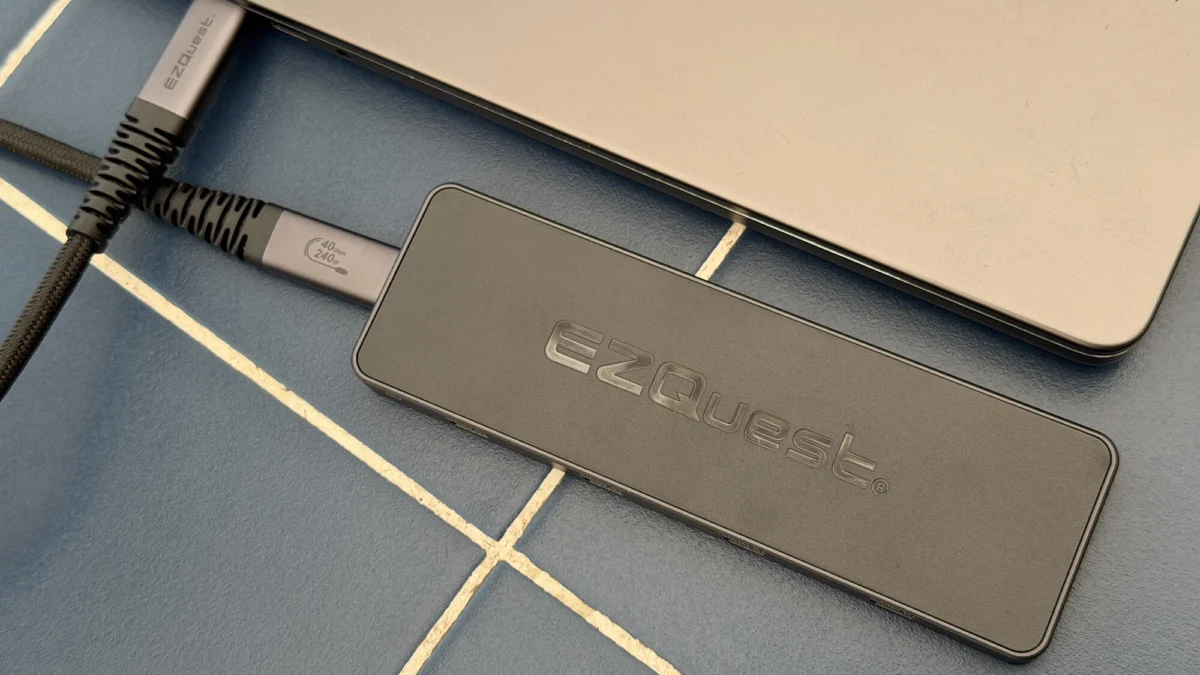
The modern computing landscape is defined by a paradoxical trend: while the processing power of laptops and desktop systems continues to reach unprecedented heights, the physical connectivity options provided by manufacturers are shrinking. In a bid to achieve thinner chassis and reduce production costs, many hardware vendors have stripped away legacy ports, leaving users with a handful of USB-C or Thunderbolt sockets. This shift has catalyzed a massive surge in the peripheral market, specifically for docking stations and hubs. However, most solutions require a compromise between portability and performance. The EZQuest Pro Series USB 4 Dual Display 8-in-1 hub represents a strategic entry into this market, utilizing specific Intel silicon to bridge the gap between high-end desktop docks and lightweight travel adapters.
Technical Architecture: The Hoover Ridge Advantage
At the heart of the EZQuest 8-in-1 hub lies the Intel "Hoover Ridge" JHL8140 chipset. To understand the significance of this component, one must look at the hierarchy of Intel’s controller ecosystem. The JHL8140 is a refined, cost-efficient version of the JHL8440 "Goshen Ridge" chip, which is the standard-bearer for premium Thunderbolt 4 docking stations.
While the Goshen Ridge chipset is designed for stationary docks that require a dedicated, often heavy, AC power brick to manage high-bandwidth data and massive power passthrough, Hoover Ridge is optimized for bus-powered or PD-powered portable devices. By utilizing genuine Intel silicon rather than third-party controllers from manufacturers like VIA Labs or Realtek, the EZQuest hub ensures higher compatibility with the USB 4 and Thunderbolt 4 specifications. This includes native support for DisplayPort 1.4a video protocols, which is critical for maintaining high refresh rates and resolutions over a single cable.
The JHL8140 allows this hub to remain remarkably compact. Measuring just 5.5 by 1.7 by 0.4 inches and weighing a mere 1.6 ounces, the device is designed for professionals who require a "mobile office" setup without the burden of additional weight. Despite its small stature, the integration of USB 4 technology allows for a theoretical maximum bandwidth of 40Gbps, though the hub is configured to balance this across its various output ports.
Port Configuration and Connectivity Standards
The EZQuest hub features a total of nine USB-C ports when including the host connection. This "all-USB-C" approach reflects a forward-looking design philosophy, moving away from the aging USB-A standard. The port distribution is engineered to handle a variety of tasks simultaneously:
- Host Connection: A dedicated port for the host device. Unlike many portable hubs that feature a hardwired "pigtail" cable, the EZQuest uses a detachable cable. This design choice increases the longevity of the device; if the cable fails, the user can replace it rather than discarding the entire hub. It also allows users to swap the included 19.6-inch cable for a longer or shorter one depending on their desk configuration.
- Power Delivery (PD) 3.0: A 100W PD input port allows for pass-through charging. The hub intelligently manages this power, allocating up to 77W to charge the host laptop while reserving 23W to power the hub’s internal circuitry and any attached peripherals.
- High-Speed Video and Data: Three USB 4 ports are included, supporting up to 8K resolution at 30Hz or 4K at 60Hz. These ports also support Gen 2 data speeds (10Gbps) and provide up to 15W of output power, sufficient for charging smartphones or powering external SSDs.
- Peripheral Data Ports: Four additional USB-C Gen 2 ports provide 10Gbps data speeds and 7.5W (5V/1.5A) of power output. These are intended for lower-power devices such as keyboards, mice, or thumb drives.
For users operating dual-monitor setups, the hub supports two 4K displays at 60Hz. This capability is compatible across a wide array of operating systems, including Windows, Linux, Android, and Chrome OS. Crucially, it supports macOS systems equipped with Apple Silicon (M1, M2, M3, and M4) in their Pro, Max, and Ultra configurations, which have historically had complex requirements for multi-monitor support over a single hub.
Data Integrity and Fast Role Swap (FRS) Technology
One of the primary risks associated with portable hubs is the "ungraceful" disconnection of peripherals when the power source is interrupted. In many cheaper hubs, if a user accidentally unplugs the charging cable from the PD port, the hub momentarily loses power as it switches to drawing energy from the laptop’s battery. This split-second lapse can cause external hard drives to disconnect improperly, leading to potential data corruption.
The EZQuest 8-in-1 hub mitigates this risk through Fast Role Swap (FRS) technology, a feature of the USB Power Delivery 3.0 specification. FRS allows the hub to switch its power role from a "sink" (receiving power from the wall) to a "source" (drawing power from the laptop) in less than 150 microseconds. This transition is fast enough that the data connection remains stable, ensuring that file transfers are not interrupted and external displays do not flicker or disconnect during a power shift.

Chronology of the USB 4 Evolution
The release of products like the EZQuest Pro Series marks a significant milestone in the timeline of USB development. To understand its place in the market, one must look at the progression of the standard:
- 2019: The USB Implementers Forum (USB-IF) announced the USB 4 specification, based largely on the Thunderbolt 3 protocol contributed by Intel. This was a major step toward unifying the fragmented USB and Thunderbolt ecosystems.
- 2020-2021: The first wave of USB 4 controllers reached the market, primarily in high-end laptops. However, peripherals were slow to follow, often relying on older USB 3.2 Gen 2 chips.
- 2022: Intel introduced the "Hoover Ridge" JHL8140 controller, specifically designed to lower the cost of entry for USB 4 peripherals while maintaining the performance standards of Thunderbolt 4.
- 2024: Products like the EZQuest 8-in-1 hub have matured the technology, offering stable dual-display support and high-wattage power delivery in a form factor that was previously impossible.
Market Context and Professional Use Cases
The necessity for such a device is driven by the "prosumer" market—users who demand professional-grade stability but require the flexibility of a mobile setup. While the hub lacks a built-in Ethernet port—a common criticism from some power users—the inclusion of seven downstream USB-C ports allows for easy expansion via inexpensive adapters. For many modern professionals, the trade-off of a slightly smaller hub in exchange for using a USB-C to Ethernet adapter when needed is a logical compromise.
Industry analysts note that the shift toward USB-C exclusivity in laptops like the MacBook Air and the Dell XPS series has created a "dongle economy." However, the EZQuest approach moves away from the "dongle" (a single-purpose adapter) toward a "centralized hub" (a multi-purpose node). This centralization is particularly beneficial for creative professionals—photographers, videographers, and designers—who need to connect high-speed storage and multiple color-accurate displays simultaneously.
Comparative Analysis: Portable Hubs vs. Desktop Docks
When evaluating the EZQuest 8-in-1 hub against traditional desktop docking stations, several distinctions emerge. Desktop docks, such as those from CalDigit or Plugable, often feature a wider array of legacy ports, including SD card readers, Toslink audio, and DisplayPort/HDMI sockets. They are, however, significantly larger and require their own power source.
The EZQuest hub occupies a middle ground. It offers the data throughput and display capabilities of a high-end dock but maintains the footprint of a travel adapter. The $119.99 price point reflects this positioning; it is more expensive than basic USB-C hubs (which often range from $30 to $60) but significantly more affordable than $300 Thunderbolt 4 desktop docks.
Broader Impact and Industry Implications
The success of USB 4 peripherals like the EZQuest hub signals a broader industry shift toward the standardization of the USB-C connector. As more devices adopt the USB 4/Thunderbolt 4 standard, the interoperability between different hardware ecosystems (Windows and Mac, for instance) becomes more seamless. This reduces electronic waste by allowing users to keep the same peripherals even when they switch computer platforms.
Furthermore, the implementation of Intel’s Hoover Ridge chipset in third-party hardware suggests a more collaborative relationship between Intel and peripheral manufacturers. By providing high-quality, cost-reduced silicon, Intel is ensuring that the USB 4 ecosystem remains competitive against proprietary or lower-spec alternatives.
In conclusion, the EZQuest Pro Series USB 4 Dual Display 8-in-1 hub is a manifestation of the current state of computer connectivity: a drive toward minimalism in the host device, necessitating highly sophisticated, intelligent hubs to manage the user’s workflow. With its focus on data integrity through FRS, its high-bandwidth Intel-driven architecture, and its compact design, it serves as a critical tool for the modern professional navigating a port-depleted hardware world. While it may require an additional adapter for those still reliant on wired Ethernet, its core performance metrics—8K video support and 10Gbps data speeds—set a high bar for the portable peripheral market.
