

The landscape of internet security has reached a critical juncture this week as the two major players in the web browser market, Mozilla and Google, released comprehensive updates to address a combined total of over 200 security vulnerabilities. As cyber threats become increasingly sophisticated, the maintenance of browser integrity has moved to the forefront of digital defense strategies. These updates, which affect Firefox version 159 and the latest stable channel of Google Chrome, represent a significant effort to close loopholes that could allow for unauthorized code execution, browser crashes, and the bypassing of essential security sandboxes.
The release of Firefox 159 marks a major milestone for Mozilla, providing patches for 167 security bugs across multiple platforms, including Windows, Android, macOS, and Linux. Simultaneously, Google has updated Chrome to version 156.0.8078.73/.74 for Windows and Mac, and 156.0.8078.73 for Linux, addressing 52 security flaws. A notable trend in this latest round of patches is the involvement of artificial intelligence researchers in identifying these vulnerabilities, signaling a shift in how software is audited and secured in the modern era.
Firefox 159: A Comprehensive Security Overhaul
The sheer volume of security fixes in Firefox 159 is staggering, with 167 bugs addressed in a single update. According to Mozilla’s security advisory, 108 of these vulnerabilities were classified as "high severity," a designation reserved for flaws that could potentially allow an attacker to gain control of a user’s system or steal sensitive data. The remaining bugs were categorized as moderate or low severity, yet they still pose a cumulative risk to the stability and privacy of the user experience.
A significant portion of these vulnerabilities—nearly 100—are defined as use-after-free (UAF) flaws. In the context of computer science, a use-after-free vulnerability occurs when a program continues to use a pointer after the memory it refers to has been cleared or deallocated. This memory management error is a favorite target for exploit developers. By manipulating the memory, an attacker can cause the browser to crash or, more dangerously, redirect the execution flow to run malicious code.
Furthermore, several of the identified bugs involved breaches of the Firefox Sandbox. The sandbox is a critical security layer that isolates the browser from the rest of the operating system. Its primary purpose is to ensure that even if a malicious website manages to exploit a browser vulnerability, the "damage" is contained within the sandbox and cannot reach the user’s personal files or system hardware. The discovery of sandbox-escape vulnerabilities is particularly concerning for security experts, as it represents a failure of the browser’s last line of defense.
To mitigate these risks, Mozilla urges all users to update their browsers immediately. The process involves navigating to the "About Firefox" section under the Help menu, which triggers an automatic check for the latest version. A full restart of the application is required to finalize the installation of these critical patches.
Enhanced Productivity and AI Integration in Firefox
Beyond the critical security patches, Firefox 159 introduces several features designed to enhance user productivity and streamline the browsing experience. One of the most prominent additions for macOS users is the integration of the native macOS share picker. This feature allows users to share web pages directly through system-level tools, providing a preview of the content and quick access to AirDrop, Messages, and recent contacts. This move aligns Firefox more closely with the native operating system environment, reducing friction for Mac enthusiasts.
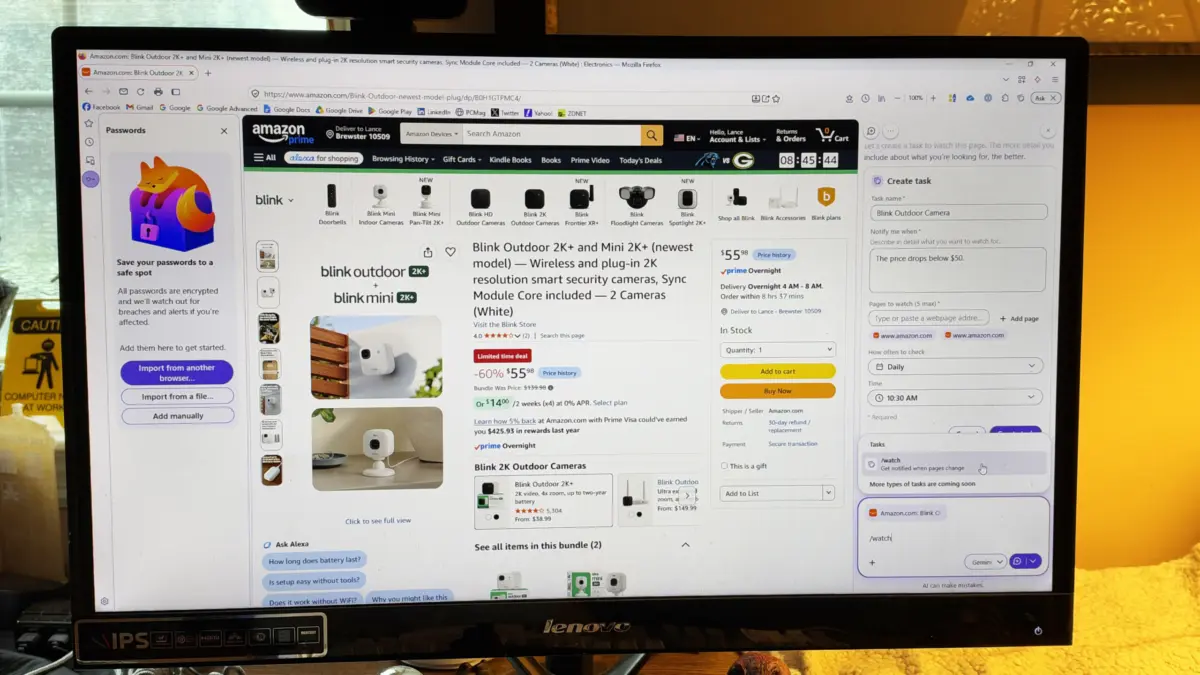
Another significant quality-of-life improvement is the accessibility of the Firefox password management tool within the browser’s sidebar. By allowing users to view and manage their credentials without leaving their current tab, Mozilla is emphasizing the importance of secure password habits. This sidebar integration is part of a broader trend in browser design to provide "heads-up" access to essential tools like history, bookmarks, and now, security credentials.
Perhaps the most forward-looking feature in version 159 is the "Smart Window," an AI-powered tool designed to monitor the web for changes. This feature allows users to set up automated watches on specific web pages. By using the /watch command within the Smart Window interface, users can receive notifications the moment a page is updated. This functionality has wide-ranging implications for researchers, shoppers tracking price drops, and professionals monitoring news cycles. It marks a transition for the browser from a passive viewing tool to an active, AI-driven assistant.
Google Chrome: Addressing Critical Memory Corruption
Google’s update to the Chrome browser, while smaller in terms of the number of bugs, is no less critical. The 52 security patches included in the latest update address four vulnerabilities rated as "critical" and 46 rated as "high." The critical flaws primarily point to memory corruption issues, which, like the UAF bugs found in Firefox, can lead to arbitrary code execution.
The Chrome update also focuses heavily on the browser’s sandbox architecture. Google has spent years refining its sandboxing technology, which is often cited as the industry standard. However, the discovery of vulnerabilities that could allow an attacker to bypass these protections remains a high priority for the Chrome security team. The update addresses several UAF issues within the browser’s core components, reinforcing the memory safety of the application.

For Chrome users, the update process is similarly straightforward. By accessing the "About Google Chrome" page through the settings menu, the browser will automatically fetch the latest build. Given the critical nature of the four top-tier vulnerabilities, security analysts recommend that enterprise environments and individual users alike prioritize this update to prevent potential "zero-day" exploits.
The Growing Role of AI in Vulnerability Discovery
A fascinating detail emerging from the security advisories of both Mozilla and Google is the acknowledgment of AI researchers and large language models (LLMs) in the discovery of these bugs. Mozilla explicitly credited Amy Burnett, a researcher at OpenAI, for identifying a significant number of the vulnerabilities patched in version 159. Similarly, Google’s blog post attributed the discovery of several flaws to Anthropic’s Claude and OpenAI’s models.
This development highlights a shift in the cybersecurity paradigm. Traditionally, bug hunting was a manual, labor-intensive process involving "fuzzing" (testing software with random data) and manual code audits. The integration of AI into this process allows for the rapid scanning of vast codebases to find patterns indicative of memory mismanagement or logic errors.
However, the relationship between browser developers and AI companies is complex. The parent company of ZDNET, Ziff Davis, recently filed a lawsuit against OpenAI, alleging copyright infringement in the training of its AI models. This legal backdrop serves as a reminder that while AI is becoming an indispensable tool for security, the ethical and legal frameworks surrounding its development and use remain a subject of intense debate.
Technical Analysis: Why Memory Safety Matters
The prevalence of Use-After-Free and memory corruption bugs in these updates underscores a fundamental challenge in browser engineering. Most modern browsers are written in C or C++, languages that provide high performance but require manual memory management. This manual control is a double-edged sword; while it allows browsers to be fast and responsive, it also opens the door to the types of memory errors that attackers exploit.
Mozilla has been a pioneer in addressing this issue by developing and integrating the Rust programming language into Firefox. Rust is designed to be memory-safe by default, preventing many of the UAF and buffer overflow issues that plague C++. As more of the Firefox codebase is migrated to Rust, the frequency of these high-severity memory bugs is expected to decrease. Google has also begun exploring the use of Rust in Chrome’s development, reflecting an industry-wide move toward "memory-safe" programming to improve long-term security.
Chronology of the Update Cycle
The release of these patches follows a standard industry timeline for vulnerability disclosure and remediation:
- Discovery: Security researchers (both human and AI-assisted) identify flaws in the browser code.
- Reporting: These flaws are reported to the developers through "Bug Bounty" programs, which often provide financial rewards for responsible disclosure.
- Verification and Patching: Engineers at Mozilla and Google verify the bugs and develop code fixes.
- Testing: The patches are tested in "Beta" and "Nightly" versions of the browsers to ensure they do not break existing features.
- Deployment: The final, stable versions are pushed to the global user base.
This cycle is essential for maintaining the integrity of the web ecosystem, as browsers serve as the primary gateway to the internet for billions of people.
Broader Impact and Security Best Practices
The simultaneous patching of hundreds of bugs in Firefox and Chrome serves as a stark reminder of the persistent threats facing internet users. For businesses, these updates are not merely optional; they are a vital component of institutional risk management. Unpatched browsers are one of the most common entry points for ransomware and data breaches.
In addition to keeping software updated, security experts recommend several best practices:
- Enable Automatic Updates: Most browsers have settings to download and install updates in the background.
- Utilize Multi-Factor Authentication (MFA): Even if a browser vulnerability exposes a password, MFA can prevent unauthorized access to accounts.
- Exercise Caution with Extensions: Third-party extensions can sometimes introduce their own security vulnerabilities or act as "spyware."
- Monitor AI Features: As browsers integrate more AI tools, like Firefox’s Smart Window, users should stay informed about how their data is being processed and stored.
As we move toward a future where AI plays a dual role as both a discoverer of bugs and a feature-enhancer within the browser, the importance of proactive security maintenance cannot be overstated. The updates released this week for Firefox and Chrome are a necessary response to an ever-evolving threat landscape, ensuring that the tools we use to navigate the digital world remain as secure as possible.
