

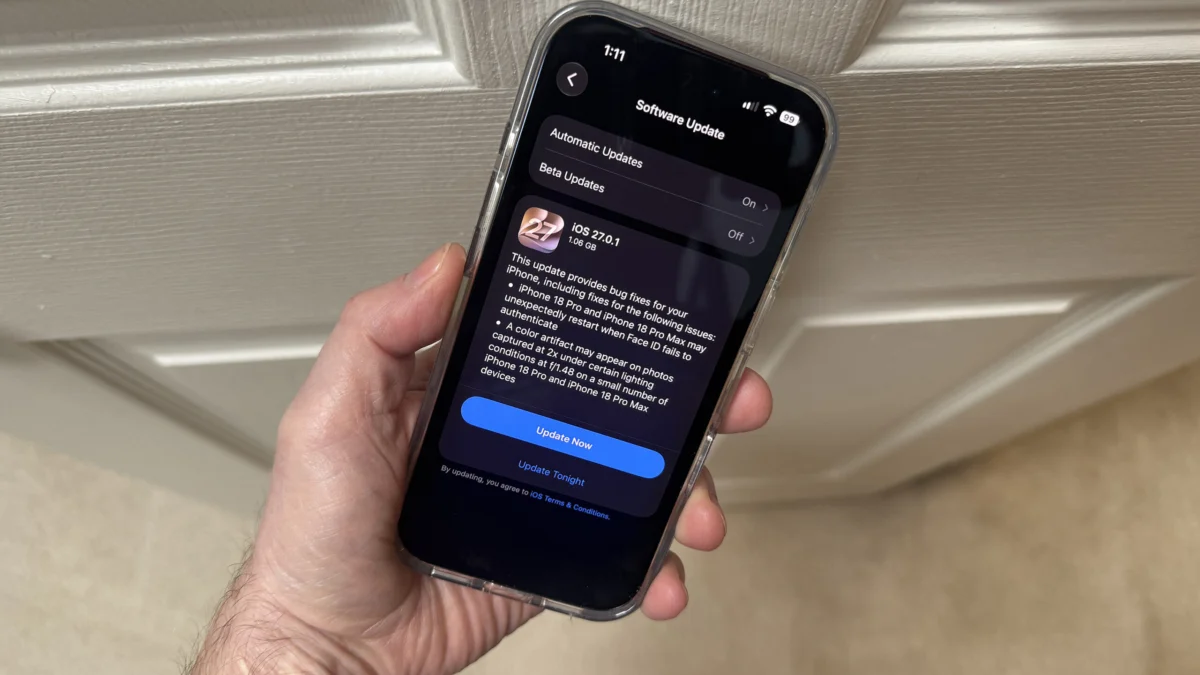
Apple has officially deployed its first corrective update for the iOS 27 operating system, aiming to resolve a series of performance issues that have plagued early adopters of the iPhone 18 Pro and iPhone 18 Pro Max. The update, labeled iOS 27.0.1, arrived on Monday following a week of increasing user reports regarding intermittent device freezes and spontaneous system restarts. While the release is primarily focused on the flagship Pro lineup, it also includes stability patches for the broader range of devices compatible with the iOS 27 ecosystem.
The most prominent issue addressed in this update involves a critical failure in the Face ID authentication pipeline. According to technical documentation and user testimonials, the iPhone 18 Pro series—Apple’s first generation to feature under-display facial recognition technology—encountered a software-level conflict when the biometric sensor failed to authenticate a user on the first attempt. This specific "authentication loop" frequently resulted in the device becoming unresponsive for several seconds or, in more severe cases, performing a full kernel panic and rebooting.
Technical Analysis of the Face ID Glitch
The instability appears to be deeply rooted in the new hardware architecture of the iPhone 18 Pro. Unlike previous iterations such as the iPhone 16 and 17, which housed Face ID components within the "Dynamic Island" cutout, the iPhone 18 Pro utilizes a sophisticated under-display sensor array. This system operates by firing infrared beams through the pixel gaps of the OLED display. To notify users that the sensor is active, Apple implemented a subtle visual cue: a thin white line that appears briefly beneath the system clock.
Research conducted by independent technical analysts at 9to5Mac suggests that the bug was triggered when users interacted with high-security applications, such as the native Passwords app, private browsing tabs in Safari, or third-party banking software. If the initial Face ID scan failed—perhaps due to an obscured angle or poor lighting—and the user manually prompted the system to "Try Face ID Again," the handoff between the Secure Enclave and the UI layer would stall. This stall frequently escalated into a system-wide crash.
For many users, the experience was jarring. Reports indicated that the screen would lock on the authentication prompt, ignoring all touch inputs, before the Apple logo appeared to signal a forced restart. By releasing iOS 27.0.1 within the first two weeks of the iPhone 18 Pro’s commercial availability, Apple aims to mitigate concerns regarding the reliability of its new under-display biometric suite.
Addressing Photographic Artifacts and UI Responsiveness
Beyond the biometric fixes, iOS 27.0.1 targets a specific optical anomaly identified by mobile photographers. A small subset of iPhone 18 Pro users reported seeing "color artifacts"—unintended streaks of light or chromatic aberrations—in photos captured using the 2x telephoto crop. Apple’s internal testing confirmed that this occurred under specific high-contrast lighting conditions when the camera operated at a wide f/1.48 aperture. While the company described the occurrence as affecting only a "small number" of units, the software patch refines the image signal processor (ISP) algorithms to prevent these digital artifacts from manifesting during post-processing.
Furthermore, the update provides a universal fix for a User Interface (UI) bug that affected all devices running iOS 27, including older models from the iPhone 11 onward. This glitch occurred when a user attempted to invoke the Notification Center and the Control Center simultaneously—a gesture conflict that could lead to a completely unresponsive touchscreen. The resolution of this bug ensures that the multi-touch gesture priority system functions correctly, preventing the software from "locking up" during rapid navigation.
A Synchronized Rollout Across the Apple Ecosystem
In a move to maintain software parity, Apple also released corresponding updates for its other major platforms: iPadOS 27.0.1, macOS 15.1 (or equivalent versioning), and visionOS 2.1. While the release notes for these platforms were less detailed than those for the iPhone, the company characterized them as essential maintenance releases designed to improve background stability and resolve minor performance bottlenecks.
Of particular note is the release of watchOS 27.0.1. This update follows reports that the Apple Watch Series 12 and Apple Watch Ultra 4 were experiencing random reboots similar to those seen on the iPhone 18 Pro. Diagnostic logs analyzed by developers pointed toward "timeouts" within the Apple Neural Engine (ANE). It appears that as the watchOS attempted to process complex health data or Siri requests, the ANE would fail to respond within the allotted timeframe, forcing the watch to restart. The new update optimizes the task scheduling for the Neural Engine to prevent these critical timeouts.

Chronology of the iOS 27.0.1 Launch
The path to this update began immediately following the global launch of the iPhone 18 series.
- Day 1-3: Early adopters began posting on community forums and social media regarding "ghost restarts" while using the Passwords app.
- Day 5: Tech publications, including ZDNET and 9to5Mac, began documenting the specific steps required to reproduce the Face ID freeze, confirming it was a widespread software issue rather than isolated hardware defects.
- Day 7: Apple acknowledged the reports and moved the corrective patch into the final stages of quality assurance.
- Day 10: iOS 27.0.1 is released globally to the public, alongside updates for iPad, Mac, and Apple Watch.
This rapid turnaround is consistent with Apple’s historical response to "Version 0" bugs—the term used for flaws discovered in the initial public release of a major software generation. Despite extensive beta testing cycles, the transition to new hardware components, such as the under-display Face ID sensor, often reveals edge-case bugs that only surface once the devices are in the hands of millions of consumers.
Security and Installation Recommendations
While Apple’s official security portal did not list any specific Common Vulnerabilities and Exposures (CVE) patches for this release, cybersecurity experts recommend that users install the update immediately. Stability updates often include "silent" hardening of the kernel and the Secure Enclave, even if they are not marketed as security-specific releases.
To install the update, users should navigate to Settings > General > Software Update. The device must have at least 50% battery life or be connected to a power source to initiate the installation. Given the nature of the fixes—specifically those involving the system kernel and biometric authentication—users are encouraged to perform a manual restart of their devices after the update has finished installing to ensure all background processes are properly initialized.
Broader Implications for Apple’s Hardware Strategy
The challenges associated with the iPhone 18 Pro launch highlight the inherent risks of aggressive hardware innovation. The move to under-display sensors is a significant engineering feat, as it requires the software to digitally "see through" the active pixels of the screen. Any slight misalignment in the timing of the display’s refresh rate and the sensor’s capture window can result in data errors.
Industry analysts suggest that the Face ID restart bug was likely a synchronization error. When the "Try Face ID Again" button was pressed, the display may have failed to enter the necessary "transparency mode" fast enough, causing the Secure Enclave to receive corrupted data and trigger a safety-related reboot. By resolving this via software, Apple has avoided the need for a costly hardware recall, proving that their software-defined hardware architecture remains resilient.
The prompt release of iOS 27.0.1 also serves to protect the reputation of the Apple Watch Series 12 and Ultra 4. As Apple continues to position its wearable devices as critical health tools, random restarts are more than just an inconvenience; they can lead to gaps in heart rate monitoring or fall detection. The fix for the Neural Engine timeouts ensures that these life-saving features remain active and reliable.
Looking Ahead
As the iPhone 18 Pro enters its second month on the market, the focus will likely shift from emergency bug fixes to feature expansion. Apple is expected to debut more advanced AI capabilities later in the iOS 27 cycle, which will further test the limits of the new A-series chips and the under-display sensor arrays.
For now, iOS 27.0.1 stands as a necessary "day-one" correction that stabilizes the user experience for Apple’s most expensive and advanced hardware. While bugs in a new operating system are inevitable, the speed of this resolution suggests that Apple’s software engineering teams were well-prepared for the complexities of the 2026-2027 hardware cycle. Users who have been hesitant to upgrade to the iPhone 18 Pro due to these reported freezes can now proceed with more confidence, provided they update to the latest software version immediately upon unboxing their devices.
