

The Evolution of the Naga: A 15-Year Chronology
The Razer Naga first debuted in 2009, a time when World of Warcraft was at the height of its cultural dominance. At its launch, the original Naga was a radical departure from traditional mouse design, featuring a 12-button thumb grid that allowed players to execute complex skill rotations without moving their left hand from the WASD keys. This innovation carved out a specific niche in the market, establishing the "MMO mouse" as a distinct category.
Over the subsequent decade and a half, the Naga line evolved through several key milestones:

- 2009: The original Razer Naga launches with a fixed 12-button side panel.
- 2012: The Naga Epic introduces wireless connectivity and interchangeable side grips for improved ergonomics.
- 2014: The Naga Chroma brings RGB lighting and a mechanical thumb grid.
- 2017: The Naga Trinity introduces the modular side panel system, allowing users to swap between 2, 7, and 12-button configurations.
- 2020: The Naga Pro updates the internals with the Focus+ Optical Sensor and introduces the 2, 6, and 12-button panel layout.
- 2024: The Naga V3 Pro arrives, integrating Razer’s most advanced sensor technology, a customizable "HyperScroll" wheel, and refined internal engineering.
While the exterior silhouette has remained remarkably consistent since 2015, the V3 Pro represents a significant leap in the underlying hardware, reflecting a broader trend where peripheral manufacturers prioritize internal refinement over aesthetic overhaul.
Technical Specifications and Internal Engineering
The Razer Naga V3 Pro is, by modern standards, a heavy device. Weighing between 113 and 116 grams depending on the attached side panel, it stands in stark contrast to "superlight" mice that often weigh less than half that amount. However, an analysis of the internal architecture reveals that this mass is the result of a deliberate focus on durability and feature density.
Internally, the Naga V3 Pro is described by hardware analysts as "over-engineered." The device utilizes a complex arrangement of six separate circuit boards connected by standardized ribbon cables. This modular internal design allows for the placement of micro-switches directly beneath their respective buttons, providing a more tactile and responsive user experience compared to designs that rely on long plastic actuators.

The primary sensor is the Focus Pro 35K Optical Sensor Gen-2, which offers a maximum sensitivity of 35,000 DPI and a tracking speed of 750 inches per second (IPS). While such high DPI figures are often marketing-driven, the sensor’s ability to track accurately on various surfaces—including glass—provides a tangible benefit for users who do not always play on a dedicated mouse pad. Furthermore, the mouse supports a 1,000 Hz polling rate out of the box, with the capability to reach 8,000 Hz if paired with a separate HyperPolling Wireless Dongle.
Modular Versatility: The Three-Panel System
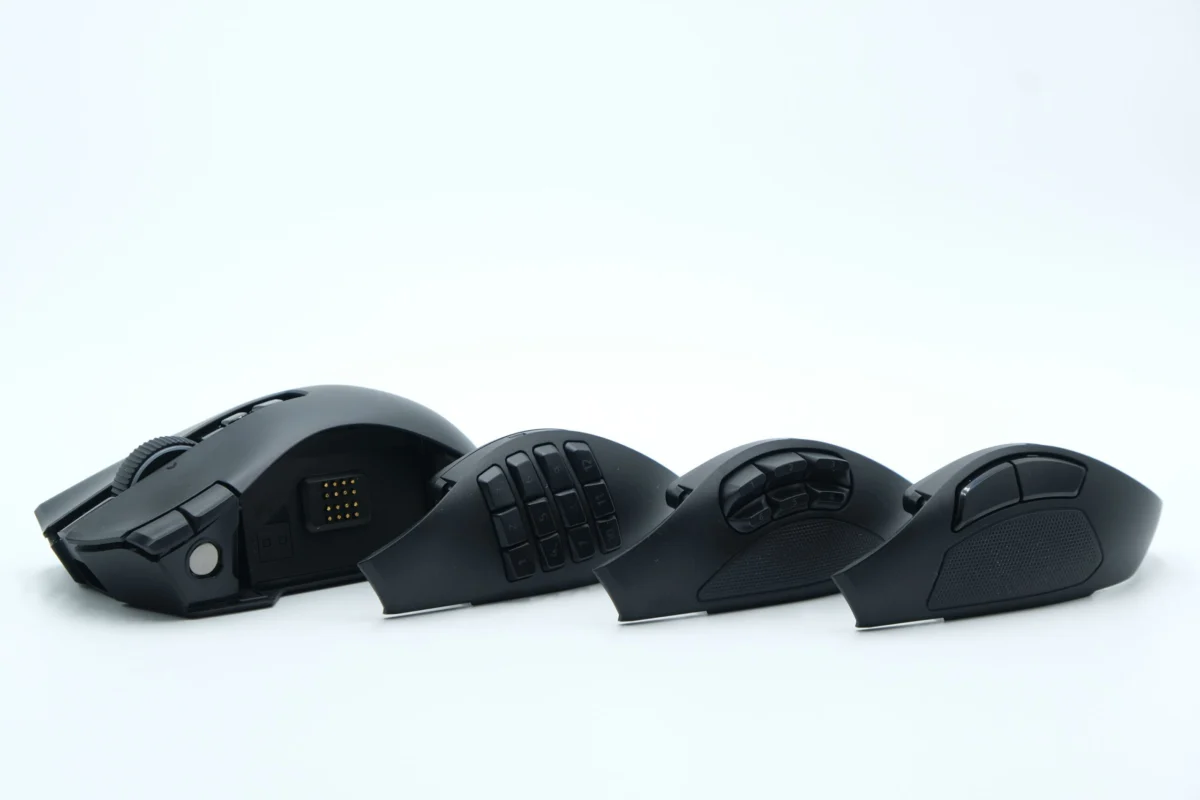
The defining characteristic of the Naga V3 Pro remains its magnetic, hot-swappable side panels. These panels connect to the main body via a grid of gold-plated pogo pins, allowing the software (Razer Synapse) to instantly detect the configuration and apply the corresponding keymap.
- The 12-Button Grid: This panel is designed for MMO and MOBA (Multiplayer Online Battle Arena) players. It provides a full numerical grid under the thumb. While earlier models featured a "homing bar" on the center row to help users orient their thumb, the V3 Pro relies on the sculpted, concave shape of the buttons to provide tactile differentiation.
- The 6-Button Layout: Positioned as a middle ground, this panel features two rows of three buttons. It is particularly effective for "Battle Royale" titles or movement-heavy games where players need quick access to specific items or abilities without the clutter of a full 12-button grid.
- The 2-Button Standard: This configuration mimics a traditional gaming mouse, providing two large, rubberized buttons. This panel is intended for general use and first-person shooters, where agility and a secure grip are prioritized over macro accessibility.
Ergonomics and Daily Utility
The Naga V3 Pro is designed primarily for a palm grip, featuring a wide chassis that supports the entirety of the hand. A notable addition in the V3 Pro is the refined third mouse button located on the far right of the device. This button, intended for the ring finger, can be mapped to any function or used as a "shift" key (Razer Hypershift) to double the number of available commands on the other buttons. For users who find the third button intrusive, Razer has included a physical locking switch on the underside of the mouse, effectively turning the button into a static finger rest.

Beyond gaming, the Naga V3 Pro has found a secondary market among creative professionals. The inclusion of the "HyperScroll Pro" wheel—a feature borrowed from the Razer Basilisk line—allows users to toggle between a tactile, ratcheted scrolling mode and a free-spinning, smooth mode. When combined with the horizontal tilt functionality of the wheel, the mouse becomes a powerful tool for video editing timelines and large-scale spreadsheets. This "hybridization" of the gaming mouse into a productivity tool is a growing trend as more consumers seek single-device solutions for both work and play.
Software Integration and Longevity Concerns
The functionality of the Naga V3 Pro is deeply tethered to Razer Synapse, the company’s proprietary software suite. Synapse handles everything from RGB lighting customization via the Chroma system to the recording and assignment of complex macros. While the software is praised for its intuitive interface and instantaneous profile switching, it also presents a potential point of failure regarding long-term support.
Industry analysts point to the "software-dependence" of modern peripherals as a risk for longevity. As operating systems evolve, older versions of configuration software are often deprecated. For instance, users of the original Naga Epic have reported significant difficulties maintaining functionality as Razer Synapse 2.0 has been phased out. While the physical hardware of these devices is often robust enough to last over a decade, the inability to update macros or adjust DPI settings via software can render the device obsolete. Razer has attempted to mitigate this by including on-board memory that can store up to five profiles, allowing the mouse to maintain its settings even when used on a computer without the software installed.

Market Positioning and Economic Impact
Retailing at approximately $179.99, the Razer Naga V3 Pro sits at the premium end of the peripheral market. Its primary competitors include the Corsair Scimitar Elite Wireless and the Logitech G600 (though the latter has largely been phased out in favor of newer, non-MMO designs).
The high price point is justified by Razer through its "all-in-one" value proposition. By providing three distinct mouse configurations in a single package, the Naga V3 Pro targets the enthusiast who would otherwise purchase multiple mice for different genres. However, the requirement of an additional purchase for the 8,000 Hz polling dongle has been a point of contention among some consumers, who argue that a flagship product at this price should include all performance-enhancing accessories.
Broader Implications for the Gaming Industry
The release of the Naga V3 Pro suggests that the "weight wars" of the gaming mouse industry may be reaching a point of saturation. While ultra-light mice remain the standard for professional esports, there is a clear and persistent demand for feature-rich, ergonomic devices that prioritize utility over raw speed.

Furthermore, the Naga’s success highlights the importance of "legacy" in tech hardware. By maintaining a consistent shape for nearly a decade, Razer has cultivated a loyal user base that relies on the muscle memory developed over years of use. In an industry often obsessed with disruptive redesigns, the Naga V3 Pro serves as a case study in the value of iterative improvement and specialized functionality.
As the boundary between gaming and professional productivity continues to blur, the Naga V3 Pro stands as a versatile contender. Its combination of robust internal engineering, modular physical design, and sophisticated software ensures that while it may not be the fastest mouse on the market, it remains one of the most capable. For the niche of gamers who require an entire keyboard’s worth of functionality under their thumb, the Naga V3 Pro proves that in the world of high-end peripherals, there is still plenty of room for the heavyweights.
